

Peanut Visa Platinum Card Review 2026
Free virtual Visa Platinum spending a self-custody stablecoin balance: $0 annual fee, 0% added FX on USD, Visa's 1% ISA on non-USD, closed beta.

SpendNode Rating for Peanut Visa Platinum Card
Peanut's card earns its place on custody and cost rather than rewards. Funds stay in your own smart wallet until the moment a payment settles, and the fee schedule is close to empty.
Custody and cost carry the score, and the rails give the card more utility than most beta products ship with. Operational Reliability sits lowest because this is still a closed beta admitting small weekly waves, virtual-only, without a long uptime record. The design is among the most honest in the self-custody field; scale is what remains to prove.
Also relevant for Stablecoin Spending.
How It Competes
Cost Efficiency
4.2
Product Utility
4.0
Custody & Trust
4.3
Reliability & UX
3.7
Transparency
4.0

VIRTUAL CARD
Verified

SELF CUSTODY SPEND
Verified

STABLECOIN SPEND
Verified
Peanut Visa Platinum Card Overview
Non-custodial spending at 150M+ Visa merchants
The Peanut Visa Platinum is a custody-first card: free to hold, free to fund, and honest about costs - USD spend adds nothing and non-USD spend pays only Visa's 1% network ISA. What it does not do is pay you back; there is no cashback beyond the one-time $10 welcome credit. Pick it for self-custody and reach across 55+ countries with any-nationality KYC, not for rewards math. Beta access is the real constraint.
Fees & Charges
Annual Fee
Free
FX Fee
1%
ATM Fee
TBD
Requirements
Supported Regions
US, UK, EEA, LATAM, APAC, MEA
Spendable Assets
USDC, USDT, DAI
On This Page
The Peanut Visa Platinum Card is a free virtual Visa card funded by the holder's self-custodial stablecoin balance. Funds remain in the user's passkey-secured smart wallet until each payment is funded, and the card carries no annual or monthly fee, with non-USD purchases converting at Visa's network rate plus the standard 1% International Service Assessment. It entered closed beta in May 2026.
Your USDC Stays Yours Until the Terminal Beeps
Every custodial crypto card asks the same thing of you: move your money onto our platform first, then spend. The Peanut Visa Platinum refuses that premise. Your USDC sits in a smart wallet only your passkeys can operate, and the card pulls from it at the instant a payment is funded, not a minute before. Squirrel Labs, the London company behind it, cannot freeze the balance, lend it out, or take it into a bankruptcy estate, because it never holds it.
The price of that design is a spartan rewards story. There is no cashback and no yield, and the in-app points carry no cash value. You get a one-time $10 welcome credit and a fee schedule with almost nothing on it. Whether that trade appeals depends entirely on how much you value custody and reach over rebates. This review works through what the card costs, what it actually does at the terminal, and who comes out ahead using it.
Card Specs: What You Are Actually Getting
Physical and Virtual Cards
The card is virtual-only today, issued free and instantly inside the Peanut app once you clear the beta gate and KYC. Peanut has said a physical card comes later but has published no date. There is no issuance fee, no monthly fee, and no charge for the card sitting unused.
Payment Network
It runs on Visa's Platinum tier and works at roughly 150 million Visa-accepting merchants: online checkout, in-store contactless, and ATMs. Apple Pay and Google Pay work through manual card entry in the wallet apps; automatic push provisioning from the Peanut app is slated for v2. The issuer of record is Third National, operating the program under a Visa license.
Security Features
Authentication is passkey-based - there is no seed phrase and no private key export. The session-key permission you grant at setup is scoped to two actions only: funding your own card collateral and sending to recipients you sign for. Lost or stolen cards are handled through support (help@peanut.me), with liability ending once you report. The sharper risk sits on your side: without a passkey backup, a lost phone means a lost wallet. Peanut's own app says exactly that.
Getting the Card
Access has two layers. The Peanut app itself is invite-only - you cannot create an account without a code - and the card then runs its own closed-beta waitlist, admitted in waves of roughly 20 per week with Peanut OG, Devconnect BA, and Arbiverse badge holders whitelisted past the queue.
Signing up through SpendNode's link applies the invite code spendnode automatically: it opens the app for you, and the card waitlist runs from there. Once admitted, the path is short - KYC via Persona with a passport or national ID from any country (no local documents required anywhere), then the virtual card is issued free and can be added manually to Apple Pay or Google Pay.
How Spending Works
Example: a €40 dinner in Lisbon
Step 1: Fund. Your balance already holds 500 USDC, deposited earlier from an exchange over Solana - free, gas covered, credited in about a minute. Nothing needs pre-loading onto the card; the balance is the card.
Step 2: Tap. The terminal requests €40. Peanut's session-key permission moves the equivalent USDC from your smart wallet into the card program's collateral, converts at Visa's network exchange rate, and approves the charge. The merchant sees an ordinary Visa Platinum transaction.
Step 3: The math. At a Visa rate of, say, 1 EUR = 1.15 USD, €40 costs $46.00, plus the 1% International Service Assessment: $0.46. Total: $46.46 debited from your balance. Peanut adds nothing on top.
Step 4: After. No cashback lands, because there is none to land. If this was part of your first $100 of card spend, it counts toward unlocking the $10 welcome credit. Expect a short hold on the moved collateral while the transaction settles - hotel and fuel pre-authorizations can stretch that window, which is normal Visa behavior rather than a Peanut quirk.
Fees and Rates
One tier, so the analysis is pure fee exposure. Three realistic profiles:
| Profile | Monthly pattern | Annual Peanut-side cost |
|---|---|---|
| Light, USD-denominated | $500/month online, USD | $0 |
| Mixed nomad | $1,000/month, 60% non-USD | ~$72 (1% ISA on $7,200) |
| Heavy foreign spender | $3,000/month, all non-USD | ~$360 (1% ISA on $36,000) |
Two costs sit outside the card itself. Converting between currencies in-app carries the rate provider's spread, roughly 0.5% EUR/USD and 0.8% into ARS or BRL, disclosed and passed through at cost. And your own bank may charge for outgoing wires to Peanut ($25-80), though ACH, SEPA and SPEI are free end to end.
Set against the market: a bank debit card at 3% FX costs the heavy spender above $1,080 a year for the same pattern. A custodial crypto card at 1.5-2% FX costs $540-720. Peanut's $360 is among the lowest totals available without staking or subscription requirements - but an actual 0%-FX card beats it, if you qualify for one.
Rewards and Cashback
The reward program is one screen long. Complete KYC, spend your first $100 on the card, and $10 lands in your balance, subject to eligibility and program terms. Refer a friend and you both collect $10 when they activate with their own $100 of spend. That is the entire mechanic - no tiers, no multipliers.
The app also awards points through achievements and gamification. Read the terms before assigning them any value: points are promotional only, carry no cash or property value, are non-transferable, and Squirrel Labs can modify or revoke them at any time. Nothing in Peanut's public material promises a token, an airdrop, or redemption. If a points-to-token conversion ever materializes, treat it as found money, not a reason to choose the card.
Foreign Exchange: Advertised vs Reality
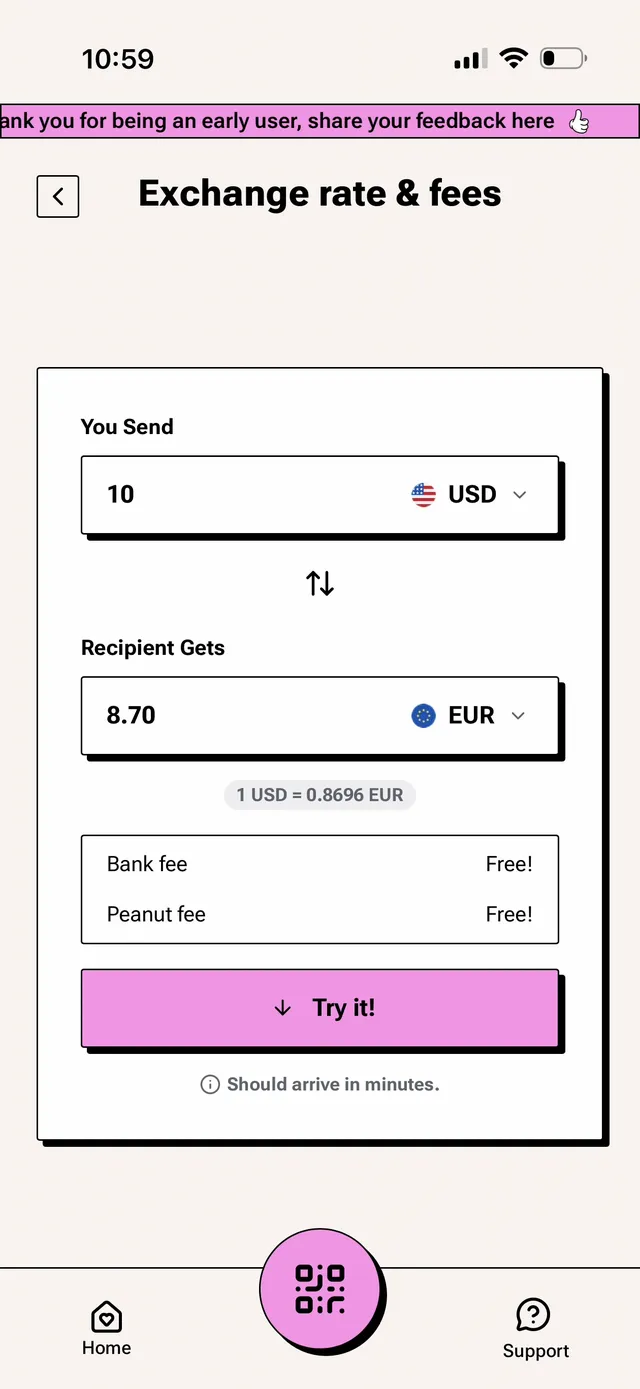
Peanut's claim is "no Peanut fee on card spending," and it holds up - with the network's own cut still applying. Concretely, on a $100-equivalent purchase in euros:
- Mid-market: $100.00
- Visa network rate: typically within ~0.1-0.3% of mid-market
- +1% ISA: ~$101.10-101.30 all-in
- Typical bank card (2-3% markup): $102-103
- True 0%-FX card (Gnosis Pay base rate): ~$100
So the honest label is a ~1% FX card, not a 0% one. Same-currency purchases cost nothing extra - a USD purchase against the USD balance never touches conversion. One practical warning from Peanut's own docs that we echo: when a foreign terminal offers to charge you in dollars, decline. That dynamic currency conversion routes through the merchant's rate, which is nearly always worse than Visa's.
We put this to a live test rather than take the pricing page on trust. In July 2026 we ran a real Peanut purchase in Malaysia: a RM 23.00 charge settled at $5.72 against our stablecoin balance. At that day's mid-market rate of 1 USD = 4.0770 MYR, RM 23.00 was worth $5.64, so we paid roughly $0.08 more, an all-in markup of about 1.4%. That figure is the 1% ISA plus Visa's network spread on the day, and it tracks the honest ~1% label above rather than the 0% some crypto cards imply. No dynamic currency conversion prompt appeared at checkout, and Peanut added no fee line of its own on top of the network cost.
The card terms reserve ceilings beyond what is charged today: FX "up to 1%" plus a cross-border fee "up to 1%," and the right to introduce interest with notice (today it is 0% APR, $0 late fee, $0 returned-payment fee). Current pricing pages and live app quotes show only the 1% ISA in effect. We will re-verify if the beta pricing hardens into something else at general availability.
Limits and Restrictions
Spending Limits
| Limit | Amount |
|---|---|
| Card spending capacity | Your funded balance (dynamic, no published cap) |
| US / Europe / UK / Mexico fiat rails | No hard limit; >$100,000 may trigger review |
| LATAM fiat rails (combined) | $2,000/month, increasable with documentation |
| Crypto deposits/withdrawals | Unlimited, no verification required |
| Minimum crypto withdrawal | $1 |
There is no published daily or monthly card cap; capacity is whatever balance backs the card, with issuer-side dynamic limits reserved in the terms. ATM limits are set by machine operators, and Peanut has not published an ATM fee of its own.
Restricted Merchants
The card terms exclude cash-like and high-risk transactions: buying crypto, foreign currency or money orders, gambling chips and betting, person-to-person transfers, and third-party bill-payment services. Cash advances and balance transfers do not exist on this card. Standard workaround applies: run those payments from a bank account and keep the card for ordinary merchant spending.
What Happens If Peanut Goes Bankrupt?
Balance: unaffected in the custody sense. Your USDC lives in your own Arbitrum smart account; Squirrel Labs' insolvency cannot pull it into an estate. The practical caveat is tooling - the smart account must remain reachable without Peanut's app, and passkey-controlled accounts are harder to self-rescue than seed-phrase wallets. Non-custodial architecture removes the FTX scenario; it does not remove operational dependence on interfaces.
In-flight payments: the collateral backing any transaction mid-settlement is the only money at risk, bounded by that single payment's size.
Card program: ends. The unclaimed welcome credit and any points evaporate (the points by their own terms never had value). Compare the stakes with a custodial card, where the entire balance is a claim against the company: here the worst case is losing a card, not a bank account.
Real User Scenarios
Scenario 1: Lucia (Buenos Aires freelancer, $800/month)
Setup: Paid in USDC, deposits over Solana, verified LATAM. Results after 6 months: She spends mostly by Mercado Pago QR at the cripto dolar rate and uses the card for international online purchases (~$200/month, USD-denominated, $0 fees). Versus her old credit card at the MEP rate, the QR rate advantage saved her roughly $95-500 across six months on ~$4,800 of spending, at Argentina's prevailing 2-11% gap. Card fees paid: $0. Welcome credit claimed: $10. Verdict: "The card handles the internet, the QR handles the street, and nobody holds my dollars but me."
Scenario 2: Marcus (Berlin-based contractor, $2,500/month, heavy EUR spend)
Setup: Paid in USDT (auto-converts to USDC), verified Europe, card added manually to Apple Pay. Results after 6 months: $2,000/month of EUR spending costs him about $20/month in ISA, $120 over the period; $500/month of USD online spend is free. His previous bank card at 2.5% FX would have cost $300 for the same euros. Net saving: ~$180, plus free SEPA withdrawals whenever he wants euros in his bank. Verdict: "One percent all-in beats my bank, but a zero-FX card would beat Peanut - if I wanted to stake for it."
Scenario 3: Anaya (Manila-based developer, $600/month)
Setup: Paid in USDT on Tron, Philippines is digital-dollar-only for Peanut, so the card is her only local Peanut spending rail. Results after 6 months: Deposits free, balance in self-custody, peso purchases through the card at ~1% ISA cost her about $36 over six months on $3,600 of spend. Her previous flow (exchange off-ramp, 1% fee, then bank withdrawal and a 2-3 day wait) cost about the same in fees but far more in time and custody exposure. GCash QR support is on Peanut's roadmap, not live. Verdict: "Same cost as my off-ramp, minus the three days and the exchange risk."
Peanut Visa Platinum Card vs Other Cards
For self-custody purists: Payy is the mirror image - also virtual, feeless, rewardless, ~1% on non-USD - built around zk-privacy instead of Peanut's banking rails. Choose Payy for privacy, Peanut for SEPA/ACH/QR reach and 11 deposit networks.
For European spenders: Gnosis Pay offers true 0% FX at the base rate plus up to 5% cashback with staked GNO, from a Safe smart wallet you control. Inside the EEA/UK it wins on pure economics. It cannot follow you to Latin America or Asia the way Peanut's rails do.
For rewards seekers: cashback cards such as Tria and xPlace Gold pay ongoing rewards, while Peanut offers a $10 one-time credit. Gold's 1.5% USDC Credit Mode rate is capped at $100/month and carries a $249 annual fee, so compare net value rather than headline cashback alone.
Peanut Visa Platinum's unique value: the only beta-stage card we track that combines wallet-until-payment self-custody with free multi-continent banking rails and KYC that accepts any nationality's documents.
Who Should Use the Peanut Visa Platinum Card?
The card fits you if custody is your first filter - stablecoins spendable without parking them on anyone's platform - and if you live or earn across borders and want SEPA, ACH, Faster Payments, SPEI and LATAM QR behind one balance. USD-heavy spenders get the best economics, since same-currency spending runs effectively free. And since the app is invite-only, the code spendnode through SpendNode's link is what gets you in.
Skip it if you want to earn on spending: there is no cashback, and the $10 welcome credit is the whole program. It is also the wrong pick if you need a finished, generally-available product rather than a beta, if you need a physical card, push-provisioned wallets, or published ATM terms today, or if passkey self-custody without a recovery desk is a responsibility you would rather not carry.
The Peanut Visa Platinum is a purpose-built tool, not an all-rounder. As a rewards card it barely registers; as a self-custody spending instrument with real banking reach it is one of the most complete designs we have tested, and the fee schedule is as clean as the marketing claims, one Visa network percent aside.
SpendNode's invite code spendnode handles the app door, so the question left is whether Peanut's coverage matches where you live and spend. If it does, take the card seriously. Just take the passkey backup screen seriously first.
Sources and Verification
All card specs, fees, and limits verified from:
- Peanut official site
- Peanut card page
- Peanut fees and pricing
- Peanut supported countries and regions
- Peanut card launch announcement
Verified against Peanut's published fee and country pages, the Peanut Spend Card Terms (effective 2026-06-01), and our own walkthrough of the closed-beta app in July 2026. Named user scenarios are composite illustrations based on published rates and limits.
Written by Aleksandar Dukic
FAQ
Does the Peanut card have an invite code?
Yes. The Peanut invite code is spendnode. Peanut is invite-only, so a code is required just to create an account. Join through SpendNode's Peanut link and the code is applied automatically - it opens the app for you. The card itself has its own waitlist once you are in.
Does the Peanut card have a welcome bonus?
Yes. Complete KYC and spend your first $100 on the card and Peanut credits $10 to your balance, subject to eligibility and program terms. If a friend you refer activates their own card the same way, you both receive $10.
Which stablecoins can fund the Peanut card?
The card spends your Peanut balance, which is held in USDC. You can deposit USDC, USDT, or DAI - USDT and DAI auto-convert to USDC at market rate with no conversion fee. Deposits work across 11 networks, including Solana, Arbitrum, Base, Tron, Polygon and Ethereum, with gas covered by Peanut and no minimum amount.
Does the Peanut card charge FX fees?
Peanut adds nothing on top of Visa's rate. Purchases in the same currency as your balance cost no extra. Purchases that convert to another currency use Visa's network exchange rate plus the standard 1% International Service Assessment, which is a Visa network fee rather than a Peanut charge.
When a terminal abroad offers to charge you in US dollars instead of the local currency, decline it - that dynamic currency conversion uses the merchant's own rate, which is usually worse than Visa's.
Is the Peanut card custodial?
No. Your stablecoins stay in your own passkey-secured smart wallet until the moment a payment is funded. A scoped permission you approve once at card setup can move funds only into the card program's collateral or to recipients you sign for - Peanut cannot reach your balance.
Does the Peanut card support Apple Pay and Google Pay?
Yes, by adding the card manually in the wallet app. Automatic push provisioning from the Peanut app is on the v2 roadmap.
This is a debit card. Some merchants with pre-authorization holds (hotels, car rentals) may temporarily hold funds beyond the transaction amount.
You retain custody of your funds until the moment of spending. Your balance is not exposed to provider insolvency risk.
Fees shown above are the card's disclosed fees. Additional costs may apply: Visa/Mastercard network spread (typically 0.5-0.9%), crypto-to-fiat conversion spread at point of sale, and blockchain gas fees for on-chain top-ups.
Found any issues?
User Reviews
Reviews are moderated and may take a moment to appear.