
CASHBACK
Verified

PHYSICAL CARD
Verified

NO ANNUAL FEE
Verified
Our Official Verdict
High-Volume US Spender: $2,000 Daily ATM Access
The BitPay Mastercard is the original heavy-hitter for US users. With TBD rewards and a Free annual fee, it serves as a straightforward, high-capacity off-ramp for Bitcoin and stablecoin holders.
Fees & Charges
Annual Fee
Free
FX Fee
3%
ATM Fee
2.5%
Requirements
Supported Regions
US
Spendable Assets
BTC, ETH, USDC, USDT
BitPay Mastercard Review
The BitPay Mastercard is a US-only custodial prepaid debit card with merchant-specific cashback offers via the BitPay app, $0 annual fee, 3% FX fee on international transactions, $2.50 flat ATM fee, $2,000 daily ATM limit, $25,000 monthly spending limit, Apple Pay support, and support for BTC, ETH, USDC, and USDT. New applications have been paused since June 2023 after Metropolitan Commercial Bank exited crypto banking partnerships.
Applications Paused - This Is a Reference Page
New applications have been paused since June 2023. BitPay halted all new card signups after its banking partner, Metropolitan Commercial Bank, announced it would exit all crypto-related banking partnerships. No relaunch date has been announced as of February 2026. Existing cardholders can still use their cards.
This page is maintained for reference - for existing cardholders evaluating whether to keep using the card, and for prospective users who want to understand the product in case BitPay relaunches with a new banking partner.
If you are looking for an active US crypto card, see:
- Coinbase Card - Up to 4% crypto rewards, 0% fees on USDC spending, FDIC insurance
- Gemini Credit Card - Up to 4% BTC cashback, Mastercard World Elite credit card, no staking required
Card Specs: What Existing Cardholders Have
Physical and Virtual Cards
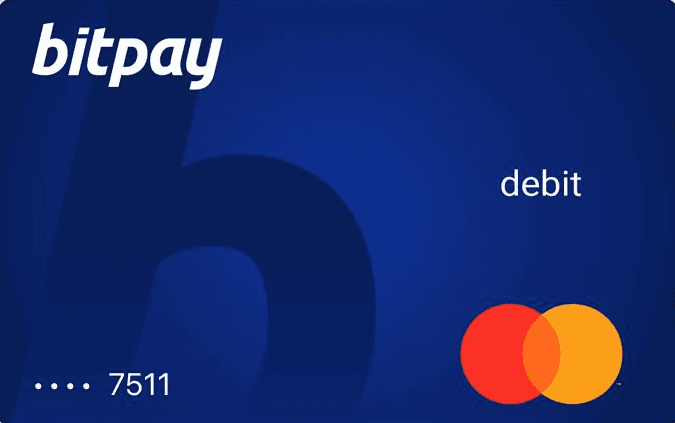
- Physical card: Standard BitPay-branded Mastercard
- Virtual card: Available in the BitPay app
- Design: Black card with BitPay logo
Payment Network
- Network: Mastercard
- Acceptance: Everywhere Mastercard is accepted in the US
- Contactless: Yes (NFC)
- Mobile wallets: Apple Pay
- Card type: Prepaid debit (load balance from BitPay wallet, crypto converts to USD at load time)
Security Features
- Prepaid model: Maximum loss limited to loaded balance (no overdraft, no credit risk)
- BitPay wallet: Self-custodial wallet app for holding crypto before loading the card
- Card controls: Freeze/unfreeze in BitPay app
- Transaction alerts: Push notifications for purchases
- Mastercard zero liability: Standard fraud protection
How Spending Works: Transaction Flow
Example: $120 dinner in New York (BTC-funded)
Step 1: Load your card
- Open the BitPay app
- Select BTC from your BitPay wallet
- Convert BTC to USD at the current exchange rate
- Important: Crypto is converted to USD at the time of loading, not at the time of spending
- Your card now holds a USD balance
Step 2: Pay at the restaurant
- Tap your BitPay card or use Apple Pay
- Restaurant charges $120
Step 3: Settlement
- $120 deducted from your prepaid USD balance
- No conversion at point-of-sale (already converted at load time)
- FX fee: 0% (USD-to-USD domestic)
- Total fees on this transaction: $0
Step 4: Merchant rewards
- Check BitPay app for merchant-specific cashback offers
- Rewards vary by merchant and are not guaranteed on every purchase
- If the restaurant is a participating merchant: variable cashback
- If not: no rewards on this transaction
International transaction example: $120 dinner in London (GBP)
- FX fee: 3% = $3.60
- Merchant reward: Variable (if applicable)
- Net cost: -$3.60 minimum (3% loss before any potential merchant reward)
Fee Deep Dive: The Real Cost
| Fee | Amount | Notes |
|---|---|---|
| Annual fee | $0 | No subscription |
| FX fee | 3.0% | Highest among major crypto cards |
| ATM fee | $2.50 | Flat fee per withdrawal |
| Conversion fee | Included at load | Crypto converts to USD when loaded |
| Monthly maintenance | $0 | No recurring charges |
| Card issuance | $0 | Free |
Net Return Analysis
| Transaction Type | Merchant Reward | FX Fee | ATM Fee | Net |
|---|---|---|---|---|
| Domestic (no merchant offer) | 0% | 0% | N/A | 0% |
| Domestic (with merchant offer) | Variable | 0% | N/A | Variable (positive) |
| International | Variable | -3.0% | N/A | -3.0% + variable |
| ATM ($200 withdrawal) | N/A | 0% | -$2.50 | -1.25% |
| ATM ($500 withdrawal) | N/A | 0% | -$2.50 | -0.50% |
Annual Cost at Different Spending Levels (Domestic, No Merchant Offers)
| Monthly Spend | Annual Cost | Merchant Rewards Needed to Break Even |
|---|---|---|
| $500 | $0 | $0 (already at zero cost) |
| $1,000 | $0 | $0 |
| $2,000 | $0 | $0 |
Key finding: For purely domestic USD spending, the BitPay card costs nothing. The problem is that it earns nothing either (without merchant offers). Compare this to Coinbase Card which earns up to 4% on the same domestic spending, or Gemini Credit Card which earns up to 4% in BTC.
The 3% FX Problem
BitPay's 3% FX fee is the highest among all crypto cards that we track:
| Card | FX Fee | Active? |
|---|---|---|
| BitPay Mastercard | 3.0% | Paused |
| Ledger CL Card | 1.75% | Active |
| Bitget Wallet Card | 1.7% | Active |
| Crypto.com Ruby | 0% | Active |
| Coinbase Card | 0% on USDC | Active |
| Krak Mastercard | 0% | Active |
Even if BitPay relaunches, the 3% FX fee would need to be substantially reduced to compete in the 2026 market.
Merchant-Specific Rewards: The Variable Factor
Unlike cards with guaranteed cashback rates, BitPay's rewards are merchant-specific offers that appear in the app:
- Rewards vary by merchant, time period, and promotion
- Not all merchants participate
- Cashback rates are not fixed or guaranteed
- Offers rotate and may not be available when you need them
Honest assessment from our hands-on review: Merchant-specific offers are a marketing feature, not a reliable rewards strategy. You cannot plan your spending around variable offers that may or may not be available. Cards with fixed cashback rates (1-8%) provide predictable returns you can model and optimize.
Limits and Restrictions
| Limit | Amount |
|---|---|
| Monthly spending | $25,000 |
| ATM daily | $2,000 |
| Annual fee | $0 |
| Supported assets | BTC, ETH, USDC, USDT |
| Card type | Prepaid only |
| Status | Applications paused |
Availability
- US: All 50 states (for existing cardholders)
- International: Not available
- KYC: Standard US verification required
- Banking partner: Metropolitan Commercial Bank (exited crypto, current status unclear)
- Regulatory: BitPay operates as US MSB under FinCEN
What Happens If BitPay Goes Down?
Your crypto in the BitPay wallet:
- The BitPay wallet is self-custodial (you control the seed phrase)
- Your BTC, ETH, and other crypto are recoverable with your seed phrase on any compatible wallet
- Your crypto holdings are safe regardless of BitPay's operational status
Your loaded card balance (USD):
- Custodial. The USD on your prepaid card is held by the banking partner
- With Metropolitan Commercial Bank exiting crypto, the current custodial arrangement is uncertain
- In a failure, prepaid card balances may be FDIC-insured up to $250,000 (depends on the banking structure)
- Mitigation: Do not load more USD than you plan to spend in the near term
Your card functionality:
- Already partially compromised (no new applications since June 2023)
- Existing cards continue to function, but the long-term viability depends on BitPay securing a new banking partner
- If BitPay cannot find a replacement for Metropolitan, the card program may shut down entirely
Assessment after reviewing the banking situation: Elevated risk. The banking partner exit is a structural problem, not a temporary issue. Existing cardholders should have a backup card ready and minimize their loaded balance. The self-custodial BitPay wallet provides good crypto protection, but the card-specific USD balance carries uncertainty.
Real User Scenarios
Scenario 1: Mike (Denver IT Consultant, $2,500/month spending, Existing Cardholder)
Setup:
- BitPay Mastercard (existing cardholder since 2022)
- Holds 0.5 BTC in BitPay wallet
- Loads $2,500/month in USD from BTC conversion
- 95% domestic, 5% international (occasional Canadian border trips)
- Checks merchant offers weekly
Results after 12 months:
- Total spending: $30,000
- Domestic ($28,500): $0 cost, variable merchant rewards (approximately $85 from occasional offers)
- International ($1,500 at 3% FX): -$45
- Net annual position: approximately +$40
His verdict: "I have had the BitPay card since before they paused applications. It works fine for domestic spending - zero fees, occasionally I get a merchant offer. But $40/year is embarrassing compared to what I could earn elsewhere. I just switched to Coinbase Card for my main spending. Coinbase earns me 4% on USDC spending - that is $1,200/year on the same $30,000 in spending. I keep the BitPay card as a backup in case Coinbase has downtime. The 3% FX fee means I never use it outside the US."
Scenario 2: Sarah (Phoenix Freelancer, $1,200/month spending, Existing Cardholder)
Setup:
- BitPay Mastercard (existing cardholder since 2021)
- Receives payment in BTC from international clients
- Loads $1,200/month from BTC conversion
- 100% domestic USD spending
- Regular ATM user ($400/month)
Results after 12 months:
- Total spending: $14,400
- Card spending: $0 cost (all domestic)
- ATM withdrawals ($4,800, 12 withdrawals): -$30 ($2.50 x 12)
- Merchant rewards: approximately $35
- Net annual position: approximately +$5
Her verdict: "The BitPay card was fine when it launched - there were fewer alternatives. Now it is just a free card that earns nothing meaningful. The ATM fees add up if you withdraw often. I am switching to the Gemini Credit Card because it is a proper credit card with up to 4% BTC back, builds my credit score, and has no annual fee. The only reason I have not switched sooner is inertia. If you are an existing BitPay cardholder reading this, do yourself a favor and get Coinbase or Gemini."
Scenario 3: Prospective User (Cannot Apply)
Situation:
- Found BitPay while searching for US crypto cards in 2026
- Attempted to apply, discovered applications are paused
- Joined the waitlist
The alternatives they should use instead:
- Coinbase Card: Best for USDC holders (0% fees, up to 4% rewards). The most complete US crypto card in 2026
- Gemini Credit Card: Best for BTC maximalists (up to 4% BTC, Mastercard credit, builds credit score)
- Gemini Solana Edition: Best for Solana users (rewards auto-staked at up to 6.12% APR)
- Ledger CL Card: Best for security-first users (1% BTC, hardware wallet integration)
There is no compelling reason to wait for BitPay to relaunch when these active alternatives offer superior economics.
How the BitPay Mastercard Compares
For US crypto card users:
- Coinbase Card: Up to 4% crypto rewards, 0% fees on USDC, FDIC insurance, actively enrolling. Coinbase is strictly superior in every dimension - higher rewards, lower fees, better protection, and actually accepting new users
- Gemini Credit Card: Up to 4% BTC cashback, Mastercard World Elite credit card, no staking required, actively enrolling. Gemini wins on reward rates, card type (credit vs prepaid), and credit-building benefits
- Ledger CL Card: 1% BTC cashback, 2% Card Spend fee on crypto-funded transactions, 1.75% FX fee, hardware wallet integration. Ledger wins on security (hardware cold storage) but has higher fees. Both are inferior to Coinbase and Gemini on pure economics
BitPay's historical context: The BitPay Mastercard was one of the first major US crypto cards. It launched when options were limited and a simple crypto-to-USD prepaid card was genuinely useful. The market has since evolved dramatically. Cards like Coinbase (4% + 0% USDC fees) and Gemini (4% BTC credit card) have made the BitPay model obsolete even before applications were paused. If BitPay relaunches, it will need to offer guaranteed cashback rates, reduce the 3% FX fee, and match the 0% stablecoin spending that Coinbase provides.
Is the BitPay Mastercard Worth It in 2026?
For existing cardholders:
- The card works for zero-cost domestic USD spending, but earns almost nothing
- Switch to Coinbase Card (4% rewards) or Gemini Credit Card (4% BTC) for your primary spending
- Keep BitPay as a backup card only
- Do not load large balances given the banking partner uncertainty
- Never use it internationally (3% FX fee is the highest in the market)
For prospective users:
- You cannot apply. Applications have been paused since June 2023
- Use Coinbase Card or Gemini Credit Card instead
- There is no reason to join the waitlist when superior alternatives are actively enrolling
Final verdict: The BitPay Mastercard is a relic of an earlier era in crypto cards. When it launched, it was useful - a simple way to spend crypto in the US. In 2026, it is outclassed by every active US alternative. The 3% FX fee is the highest that we track. The merchant-specific rewards are unpredictable and minimal. The banking partner exit creates structural uncertainty. Existing cardholders should switch to Coinbase or Gemini for their primary spending and keep BitPay only as a backup. Prospective users should not wait for a relaunch - the US crypto card market has moved on.
Sources and Verification
All card specs, fees, and limits verified from:
FAQ
How do you choose BitPay Mastercard crypto cards?
We compare verified issuer sources, fees, and eligibility. Availability can change, so confirm with the issuer before applying.
Do all cards in this list offer the same benefits?
No. Each issuer defines its own program terms. Review the sources on each card profile.
Are these rankings or recommendations?
No. Lists are filtered views of cards in our database and do not imply rankings.
This is a prepaid card. Merchants that require pre-authorization holds (gas stations, hotels, car rentals, toll booths) may decline it. Fund only what you plan to spend.
Your funds are held by BitPay. If the provider faces insolvency, your balance may be at risk. This card does not offer self-custody protection.
Fees shown above are the card's disclosed fees. Additional costs may apply: Visa/Mastercard network spread (typically 0.5-0.9%), crypto-to-fiat conversion spread at point of sale, and blockchain gas fees for on-chain top-ups.
Found any issues?